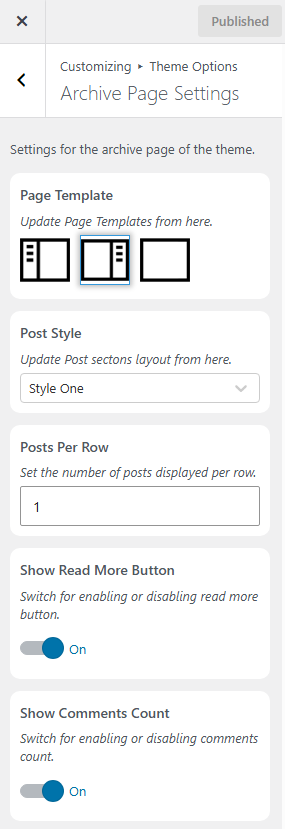
The Archive Page Settings panel allows you to customize the appearance and layout of your blog archive pages, including category, tag, author, and date archives.
Available Options
- Page Template
Choose the layout for archive pages:- Left Sidebar
- Right Sidebar
- No Sidebar (Full Width)
- Post Style
Select the layout style used to display posts on archive pages. - Posts Per Row
Set the number of posts displayed in each row. - Show Read More Button
Enable or disable the Read More button for each post. - Show Comments Count
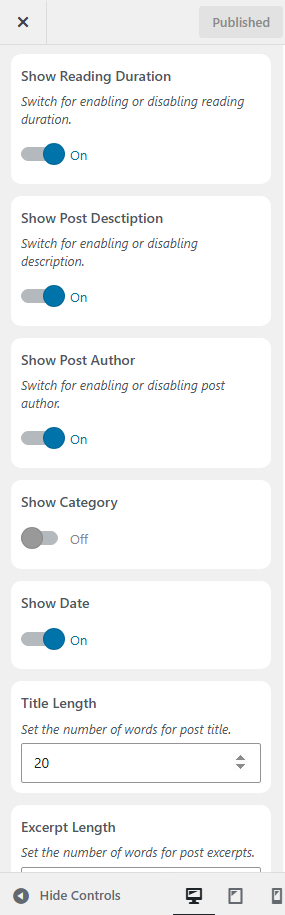
Display or hide the total number of comments for each post. - Show Reading Duration
Display or hide the estimated reading time for posts. - Show Post Description
Show or hide the post excerpt on archive pages. - Show Post Author
Display or hide the author’s name. - Show Category
Display or hide the post category. - Show Date
Display or hide the published date of each post. - Title Length
Set the maximum number of words displayed in the post title. - Excerpt Length
Set the maximum number of words displayed in the post excerpt.
Note: Changes are previewed instantly in the WordPress Customizer. Click Publish to save and apply your settings.