Set a Default Homepage
After importing the demo, you need to assign a static page as your website’s homepage.
How to Set the Homepage
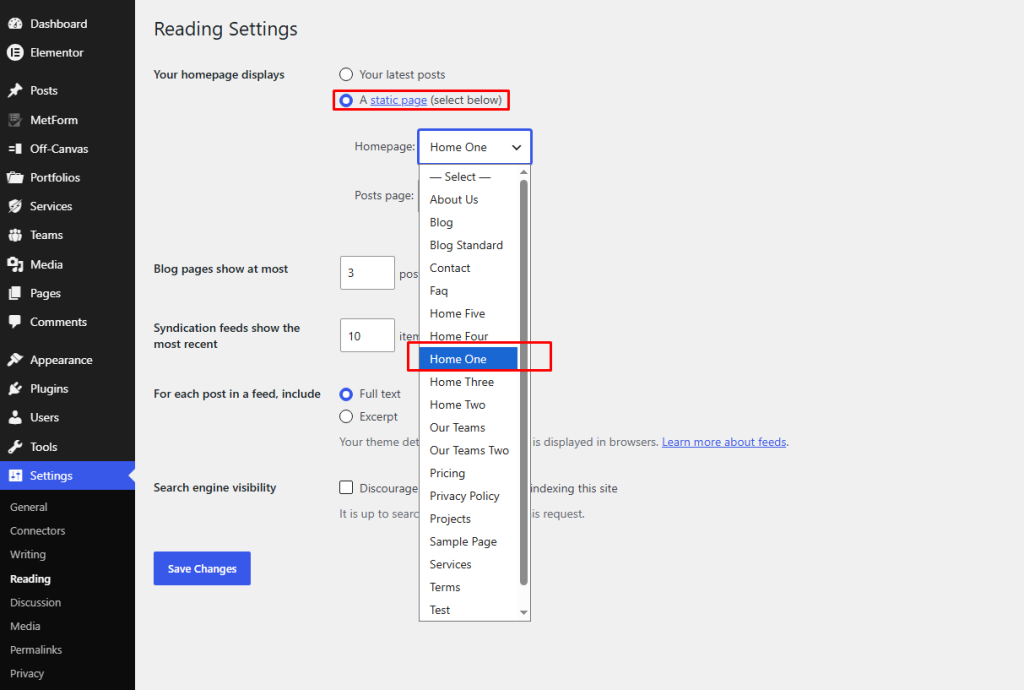
- Go to Settings → Reading from your WordPress Dashboard.
- Under Your homepage displays, select A static page.
- From the Homepage dropdown, choose the home page you want to use (e.g., Home One, Home Two, Home Three, etc.).
- (Optional) Select your Posts page if you want to display blog posts on a separate page (e.g., Blog).
- Click Save Changes.
Note: If you imported a specific demo, make sure to select the matching homepage (e.g., Home One for Demo One, Home Two for Demo Two, etc.). Otherwise, your website may not display the imported layout correctly.